Aprender / Blog / Artigo
Perguntas abertas vs perguntas fechadas: exemplos e como pesquisar usuários
A menos que você consiga ler mentes, a única maneira de descobrir o que as pessoas estão pensando é perguntar a elas.
É para isso que servem as pesquisas. Mas a maneira como você faz a pergunta geralmente determina o tipo de resposta que você recebe — e uma das primeiras decisões que você precisa tomar é: fazer uma pergunta aberta ou fechada?

Summary
Understanding the difference between open-ended and close-ended questions helps you ask better, more targeted questions, so you can get actionable answers. The question examples we cover in this article look at open- and closed-ended questions in the context of a website survey, but the principle applies across any type of survey you may want to run.
Start from the top or skip ahead to
What’s the difference between open-ended and closed-ended questions?
4 tips on how to craft your survey questions for a maximum response rate
Perguntas abertas vs fechadas: qual é a diferença?
A diferença entre perguntas abertas e fechadas é que as perguntas fechadas oferecem um conjunto específico de opções que o respondente deve escolher, enquanto as perguntas abertas permitem que os respondentes respondam como quiserem. Para entender melhor esses dois tipos de perguntas, vamos examinar cada um deles.
O que são perguntas abertas?
Perguntas abertas são questões que não podem ser respondidas com um simples "sim" ou "não" e, em vez disso, exigem que o respondente desenvolva seus pontos de vista.
As perguntas abertas ajudam você a enxergar as coisas pela perspectiva do cliente, pois obtém feedback nas suas próprias palavras em vez de respostas padronizadas. É possível analisar perguntas abertas usando planilhas, ver tendências qualitativas e até mesmo identificar elementos que se destacam com nuvens de palavras.

O que são perguntas fechadas?
Perguntas fechadas são aquelas que só podem ser respondidas escolhendo um número limitado de opções, geralmente perguntas de múltipla escolha com uma resposta de uma única palavra, "sim" ou "não", ou uma escala de classificação (ex. de concordo totalmente a discordo totalmente).
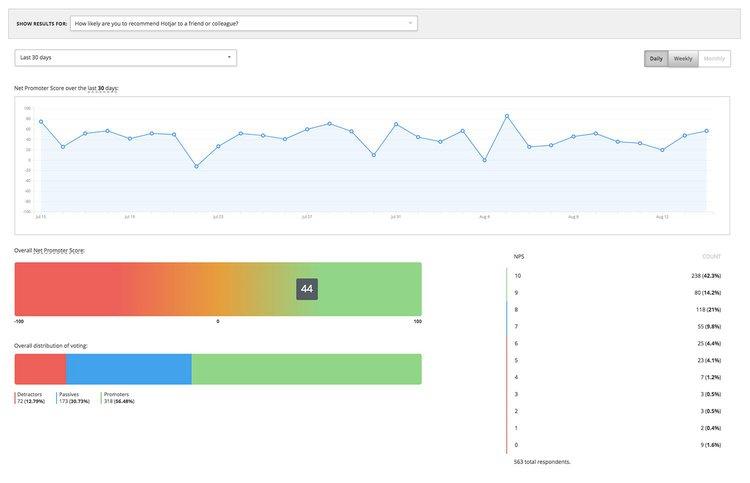
As perguntas fechadas fornecem informações limitadas, mas podem ser facilmente analisadas para obter dados quantitativos. Por exemplo, uma das perguntas fechadas mais populares em marketing é a do Net Promoter Score (NPS), que questiona as pessoas sobre "Qual a probabilidade de você recomendar este produto/serviço numa escala de 0 a 10?" e usa respostas numéricas para calcular as tendências da pontuação geral.
Quando usar perguntas abertas e perguntas fechadas
Se você faz parte de uma equipe de marketing, produto, vendas ou UX research, fazer as perguntas certas por meio de entrevistas com clientes ou pesquisas no site ajuda a coletar feedback para criar melhores experiências de usuário e, por fim, aumentar as conversões e vendas.
Geralmente, o tipo de pergunta escolhido depende do que você está tentando alcançar:
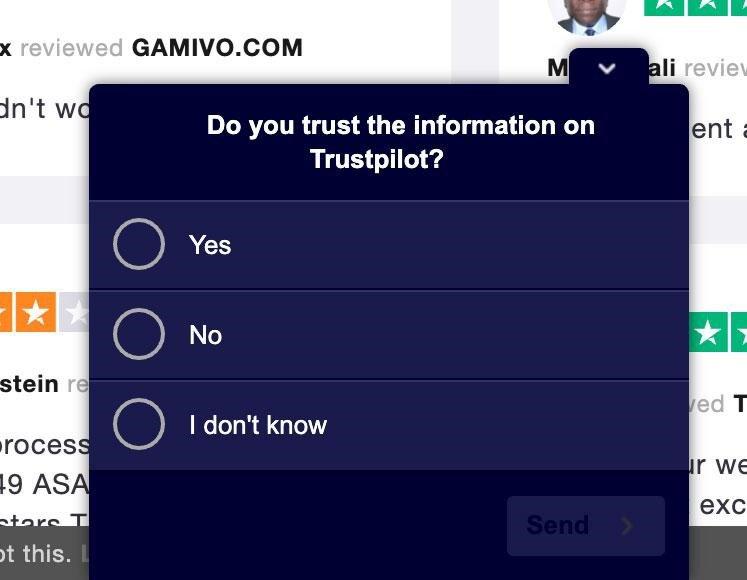
Faça uma pergunta fechada quando quiser respostas que possam ser representadas num gráfico e usadas para mostrar tendências e porcentagens. Por exemplo, as respostas para a pergunta fechada "Você confia nas informações do [site]?" ajudarão você a entender a proporção de pessoas que consideram seu site confiável contra aquelas que não consideram:
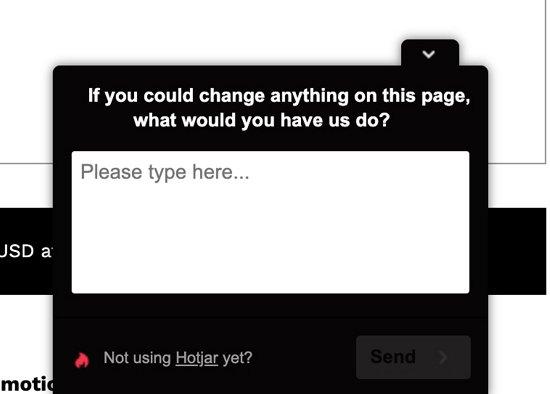
Faça uma pergunta aberta quando quiser entender melhor seus clientes e suas necessidades, obter mais contexto por trás de suas ações e/ou investigar os motivos por trás da satisfação/insatisfação com seu produto. Por exemplo, a pergunta aberta "Se você pudesse mudar alguma coisa nesta página, o que seria?" permite que seus clientes expressem, com suas próprias palavras, o que acham que você deveria fazer em seguida:
7 exemplos de perguntas abertas vs perguntas fechadas
A maioria das perguntas fechadas pode ser transformada em perguntas abertas com alguns pequenos ajustes. Aqui está um exemplo: no lado esquerdo, há perguntas fechadas; no lado direito, cada pergunta foi transformada numa versão aberta que permite que os respondentes elaborem mais.
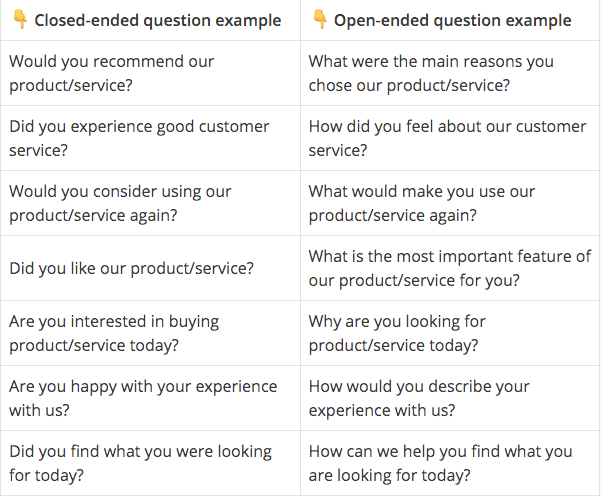
Todas as perguntas fechadas na coluna da esquerda podem ser respondidas com uma única palavra, especificamente Sim ou Não.
Essas respostas fornecem o sentimento geral de cada usuário e alguns pontos de dados úteis sobre sua satisfação, o que pode ajudá-lo a analisar tendências e porcentagens
. Por exemplo, a proporção de pessoas que se declararam satisfeitas com seu site mudou nos últimos 1, 3, 6, 12 meses?
As perguntas abertas na coluna da direita dão aos clientes a oportunidade de fornecer informações adicionais e ajudam você a entender o contexto por trás de um problema ou saber mais sobre seus USPs (pontos de venda únicos). Então se você estiver buscando dados qualitativos como esses, a maneira mais fácil de converter perguntas fechadas em abertas é pensar nas diversas respostas possíveis e reformular suas perguntas para permitir uma resposta livre.
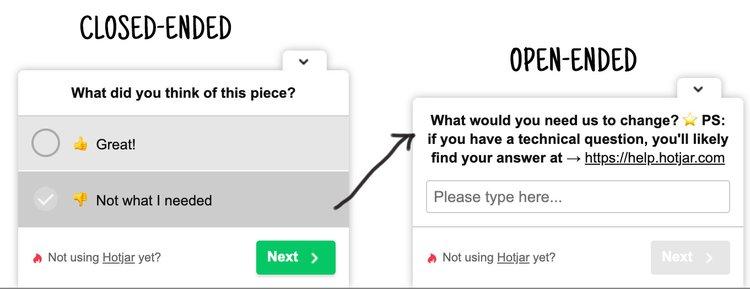
🔥 Dica: ao pesquisar visitantes no seu site, faça perguntas que possam ajudá-lo a descobrir o quê e o porquê das ações dos usuários. Você pode fazer isso combinando perguntas abertas e fechadas na mesma pesquisa:
Comece com uma pergunta fechada, que geralmente requer pouco esforço para as pessoas responderem.
Prossiga com uma pergunta aberta de follow-up, que lhes dá a oportunidade — caso queiram aproveitá-la — de elaborar a resposta.
📚 Leia mais: confira +20 exemplos reais de perguntas abertas e fechadas que você pode fazer no seu site.
💡 Pro tip: when surveying people on your website with Hotjar Surveys, our Survey Logic feature lets you ask follow-up questions that help you find out the what and the why behind your users’ actions.
For more inspiration, here are 20+ real examples of open- and closed-ended questions you can ask on your website, along with a bunch of free pre-built survey templates and 50+ more survey questions to help you craft a better questionnaire for your users.
Or, take advantage of Hotjar’s AI for Surveys, which generates insightful survey questions based on your research goal in seconds and prepares an automated summary report with key takeaways and suggested next steps once results are in.
Use o Hotjar para criar sua pesquisa e obter os insights dos clientes necessários para expandir seus negócios.
How to ask survey questions for maximum responses
It’s often easy to lead your customers to the answer you want, so make sure you’re following these guidelines:
1. Embrace negative feedback
Some customers may find it hard to leave negative feedback if your questions are worded poorly.
For example, “We hope there wasn’t anything bad about your experience with us, but if so, please let us know” is better phrased neutrally as “Let us know if there was anything you’d like us to do differently.” It might sting a little to hear negative comments, but it’s your biggest opportunity to really empathize with customers and fuel your UX improvements moving forward.
2. Don’t lead your customers
“You bought 300 apples over the past year. What's your favorite fruit?” is an example of a leading question. You just planted the idea of an apple in your customers' mind. Valuable survey questions are open and objective—let people answer them in their own words, from their own perspective, and you’ll get more meaningful answers.
3. Avoid asking ‘and why?’
Tacking “and why?” on at the end of a question will only give you simple answers. And, no, adding “and why?” will not turn closed-ended questions into open-ended ones!
Asking “What did you purchase today, and why?” will give you an answer like “3 pairs of socks for a gift” (and that’s if you’re lucky), whereas wording the question as “Why did you choose to make a purchase today?” allows for an open answer like, “I saw your special offer and bought socks for my niece.”
4. Keep your survey simple
Not many folks love filling in a survey that’s 50 questions long and takes an hour to complete. For the most effective data collection (and decent response rates), you need to keep the respondents’ attention span in mind. Here’s how:
Keep question length short: good questions are one-sentence long and worded as concisely as possible
Limit the number of questions: take your list of planned questions and be ruthless when narrowing them down. Keep the questions you know will lead to direct insight and ditch the rest.
Show survey progress: a simple progress bar, or an indication of how many questions are left, motivates users to finish your survey
5 of our favorite open-ended questions to ask customers
Now that you know how to ask good open-ended questions, it’s time to start putting the knowledge into practice.
To survey your website users, use Hotjar's feedback tools to run on-page surveys, collect answers, and visualize results. You can create surveys that run on your entire site, or choose to display them on specific pages (URLs).
Different types of Hotjar surveys
As for what to ask—if you're just getting started, the five open-ended questions below are ideal for any website, whether ecommerce or software-as-a-service:
1. How can we make this page better?
If you missed the expectations set by a customer, you may have over-promised or under-delivered. Ask users where you missed the mark today, and you’ll know how to properly set, and meet, expectations in the future. An open platform for your customers to tell you their pain points is far more valuable for increasing customer satisfaction than guessing what improvements you should make. Issues could range from technical bugs to lack of product range.
2. Where exactly did you first hear about us?
An open “How did you find out about us?” question leaves users to answer freely, without leading them to a stock response, and gives you valuable information that might be harder to track with traditional analytics tools.
We have a traffic attribution survey template ready and waiting for you to get started.
3. What is stopping you from [action] today?
A “What is stopping you?” question can be shown on exit pages; the open-form answers will help you identify the barriers to conversion that stop people from taking action.
Questions like this can also be triggered in a post-purchase survey on a thank you or order confirmation page. This type of survey only focuses on confirmed customers: after asking what almost stopped them, you can address any potential obstacles they highlight and fix them for the rest of your site visitors.
4. What are your main concerns or questions about [product/service]?
Finding out the concerns and objections of potential customers on your website helps you address them in future versions of the page they’re on and the products they’ll use. It sounds simple, but you’ll be surprised by how candid and helpful your users will be when answering this one.
Do you want to gather feedback on your product specifically? Learn what to improve and understand what users really think with our product feedback survey template and this expert advice on which product questions to ask when your product isn't selling.
5. What persuaded you to [take action] today?
Learning what made a customer click ‘buy now’ or ‘sign up’ helps you identify your levers. Maybe it’s low prices, fast shipping, or excellent customer service—whatever the reason, finding out what draws customers in and convinces them to stay helps you emphasize these benefits to other users and, ultimately, increase conversions.
Ask the right questions at the right time to get the insights you need
Whether you’re part of a marketing, product, sales, or user research team, asking the right questions through customer interviews or on-site surveys helps you collect feedback to create better user experiences and increase conversions and sales.
The type of question you choose depends on what you’re trying to achieve:
Ask a closed-ended question when you want answers that can be plotted on a graph and used to show trends and percentages. For example, answers to the closed-ended question “Do you trust the information on [website]?” helps you understand the proportion of people who find your website trustworthy versus those who do not.
Ask an open-ended question when you want in-depth answers to better understand your customers and their needs, get more context behind their actions, and investigate the reasons behind their satisfaction or dissatisfaction with your product. For example, the open-ended question “If you could change anything on this page, what would it be?” allows your customers to express, in their own words, what they think you should be working on next.
Not only is the kind of question you ask important—but the moment you ask it is equally relevant. Hotjar Surveys, our online survey tool, has a user-friendly survey builder that lets you effortlessly craft a survey and embed it anywhere on your web page to ask the right questions at the right time and place.
Build and send a survey today 🔥
Use Hotjar to build your survey and get the customer insights you need to grow your business.

Related articles

Pesquisa com usuários
5 tips to recruit user research participants that represent the real world
Whether you’re running focus groups for your pricing strategy or conducting usability testing for a new product, user interviews are one of the most effective research methods to get the needle-moving insights you need. But to discover meaningful data that helps you reach your goals, you need to connect with high-quality participants. This article shares five tips to help you optimize your recruiting efforts and find the right people for any type of research study.

Hotjar team

Pesquisa com usuários
How to instantly transcribe user interviews—and swiftly unlock actionable insights
After the thrill of a successful user interview, the chore of transcribing dialogue can feel like the ultimate anticlimax. Putting spoken words in writing takes several precious hours—time better invested in sharing your findings with your team or boss.
But the fact remains: you need a clear and accurate user interview transcript to analyze and report data effectively. Enter automatic transcription. This process instantly transcribes recorded dialogue in real time without human help. It ensures data integrity (and preserves your sanity), enabling you to unlock valuable insights in your research.

Shadz Loresco

Pesquisa com usuários
An 8-step guide to conducting empathetic (and insightful) customer interviews in mid-market companies
Customer interviews uncover your ideal users’ challenges and needs in their own words, providing in-depth customer experience insights that inform product development, new features, and decision-making. But to get the most out of your interviews, you need to approach them with empathy. This article explains how to conduct accessible, inclusive, and—above all—insightful interviews to create a smooth (and enjoyable!) process for you and your participants.
Hotjar team